Offline Exam Management for Schools: How to Plan, Conduct, and Manage Exams Efficiently
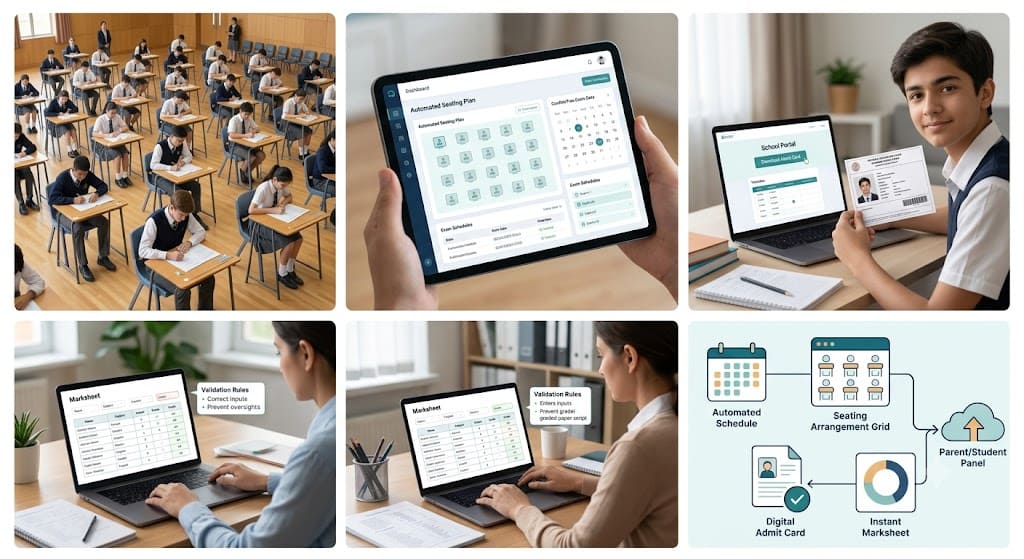
Discover how IntelCampus automates offline school exams—from scheduling timetables and seating plans to issuing digitally signed admit cards and generating instant marksheets.
Offline Exam Management for Schools: How to Plan, Conduct, and Manage Exams
Organizing traditional offline exams in schools is a massive administrative challenge. From drafting timetables and checking student eligibility to arranging seating plans, issuing hall tickets, and manually creating report cards, the traditional process takes weeks of intense effort.
Modern campus management software like IntelCampus turns this chaotic process into a seamless, automated workflow. By automating everything from pre-exam scheduling to post-exam report card generation, schools can save hundreds of administrative hours while delivering a smooth experience for teachers, students, and parents.
The Challenges of Traditional Offline Exam Management
Before adopting digital solutions, school examination departments face several recurring operational roadblocks:
-
Scheduling Conflicts: Manually creating timetables without overlapping subjects or teacher duties.
-
Complex Seating Plans: Randomizing student seats across halls to prevent copying.
-
Eligibility Delays: Manually verifying attendance percentages and fee clearances before granting admit cards.
-
Manual Mark Entry: Processing stacks of paper answer sheets and manually calculating totals, which increases human error.
-
Delayed Marksheet Distribution: Printing and manually signing physical report cards for every student.
End-to-End Exam Management with IntelCampus: Step-by-Step
The IntelCampus Exam Management Module simplifies the complete lifecycle of offline examinations into three core phases: Pre-Exam Planning, Exam Day Execution, and Post-Exam Results.
[ Pre-Exam Setup ] ➔ [ Conduct & Mark Entry ] ➔ [ Auto-Generation & Publishing ]
Auto Schedule &        Teacher Fills Marks       Digitally Signed Admit Cards
Seating Plan           in Portal                 & Marksheets Published to Panels
Phase 1: Pre-Exam Setup & Automated Scheduling
1. Automated Exam Scheduling & Date Sheets
With IntelCampus, admins can set up exam timetables with just a few clicks. The system automatically detects subject conflicts, accounts for school holidays, and generates a conflict-free exam date sheet that can be published directly to student and parent panels.
2. Exam Eligibility Management
Before issuing hall tickets, the system automatically screens every student based on predefined criteria, such as:
-
Minimum attendance percentage requirements.
-
Outstanding fee dues or clearance statuses.
-
Subject enrollment verification.
Students who meet the criteria are automatically flagged as eligible, preventing unauthorized exam entry.
3. Automatic Seating Arrangement Generation
Arranging student desk allocations manually is time-consuming. IntelCampus automatically generates optimized seating arrangements across available rooms and halls, ensuring:
-
Randomized desk allocations to maintain exam integrity.
-
Clear roll-number range mapping per exam hall.
-
Print-ready seating allocation charts for invigilators to post outside exam halls.
Phase 2: Digital Admit Cards with Verification
Once eligibility is confirmed, IntelCampus generates official Digital Admit Cards (Hall Tickets) for all eligible students.
Key Features of IntelCampus Admit Cards:
-
Digital Signatures: Automatically embedded principal/exam controller signatures for authenticity.
-
Candidate Details: Includes student photograph, roll number, exam center location, room assignment, and timetable.
-
Exam Rules & Guidelines: Printed directly on the card for quick reference.
-
Instant Download: Students and parents can view and download the admit card directly from their Student & Parent Panels to print and carry to the exam center.
Phase 3: Mark Entry & Instant Marksheet Generation
1. Simplified Teacher Mark Entry
After the offline exam is conducted and physical answer sheets are graded, teachers log into their IntelCampus portal to input marks. The system includes built-in validation rules to prevent entries exceeding the maximum score, minimizing typing mistakes.
2. Automated Marksheet & Report Card Generation
Once teachers submit the scores, IntelCampus instantly processes the data to generate official marksheets:
-
Automated Calculations: Automatically calculates totals, percentages, letter grades, percentile ranks, and pass/fail statuses.
-
Customizable Templates: Supports CBSE, ICSE, State Board, or custom grading systems.
-
Digital Endorsements: Includes pre-verified digital signatures and school logos.
Phase 4: Direct Publishing to Student & Parent Panels
Instead of holding physical report card distribution days, schools can publish results online in seconds:
-
Instant Access: Marksheets and report cards are published directly to the Student Panel and Parent Panel.
-
Download & Print: Parents can view detailed subject breakdowns, performance graphs, and download official PDF copies anytime.
-
Historical Records: All previous term marksheets remain archived in the portal for future reference during higher education admissions.
Comparison: Traditional vs. IntelCampus Exam Management
| Feature | Traditional Manual System | IntelCampus Automated System |
| Exam Scheduling | Manual creation; high risk of clashes | Automated conflict-free date sheet generator |
| Seating Plan | Hours of manual desk mapping | 1-Click automatic seating allocation |
| Eligibility Check | Manual verification of fees & attendance | Automated eligibility verification |
| Admit Cards | Physical printing & hand-signing | Digital signatures; instant download via portal |
| Marksheet Creation | Manual math, high error risk | Automated grade calculation & instant PDF generation |
| Result Distribution | Paper delivery during PTMs | Real-time publishing on Parent & Student Panels |
Final Thoughts
Managing offline school examinations does not have to be a stressful, paper-heavy process. By leveraging IntelCampus, institutions can streamline exam scheduling, seating arrangements, eligibility checks, admit card generation, and marksheet publishing into one centralized digital workflow—allowing educators to focus more on teaching and less on paperwork.
Ready to digitize fee collection at your institution?